Departments
Departments can help split the reporting between major parts of an organisation. "Department" is a posting attribute, setting up a department can be useful for absence management and reporting purposes.
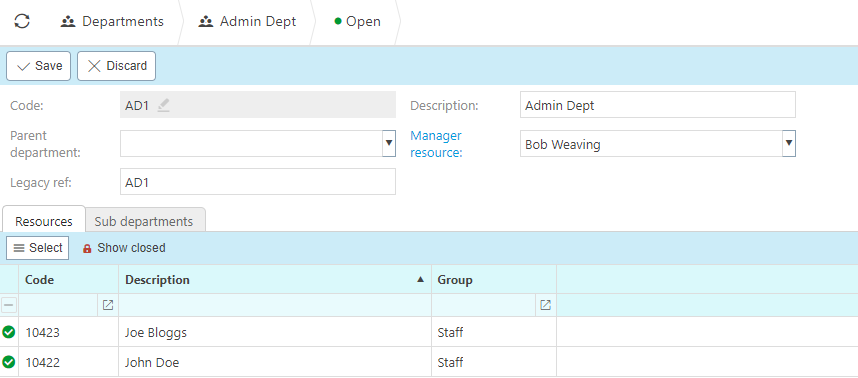
The department code should be short and capitalized, this is a unique reference field.
The description field is the name of the department.
Departments have the ability to be assigned to a parent department.
The manager resource field should be the department manger, this resource will have access to the team on the absence manager.
The legacy reference field identifies previous codes under the department names.
Resources
- Resources can be assigned to departments, this will default the department field upon document entry. These resources will also appear within the absence manager department groups.
Sub departments
- The sub departments consist of all other departments with a parent department set to the current selected department.
Order of evaluation
Document header:
- Fixed contact account (customer / supplier)
- Fixed account setup (chart of account rules)
- User entered value / saved value
- Contact account default
- Default account setup (chart of account rules)
Document detail lines:
- Fixed contact account (customer / supplier)
- Fixed product
- Fixed project
- User enter value / saved value
- User default settings
- Product default (accounting)
- Project default
- Contact account default
- Document header default